
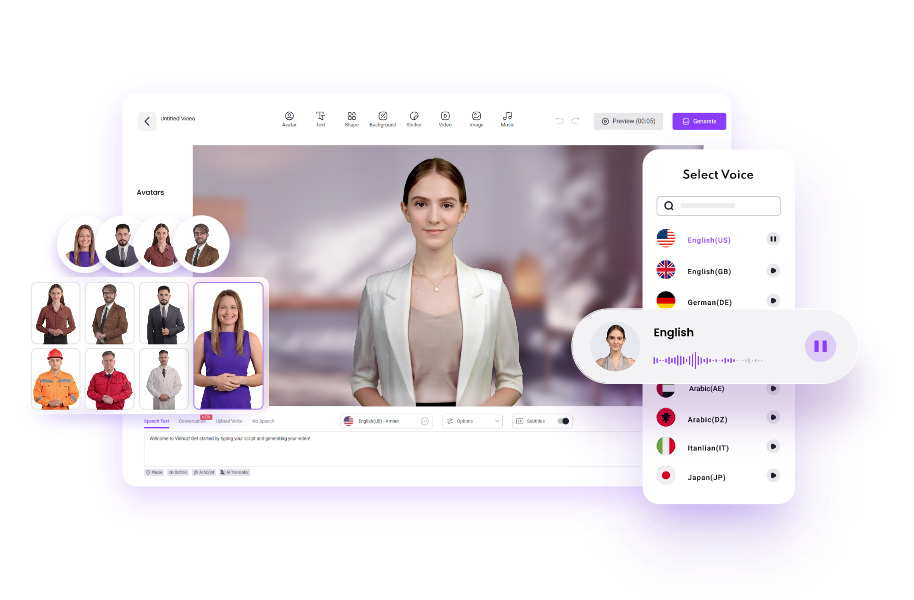
vidnoz Artificial intelligence is changing the way people create videos online. Businesses, marketers, YouTubers, educators, and social media creators now use AI tools to produce professional videos without expensive equipment or editing skills. One of the most popular AI video generators today is Vidnoz.
This platform helps users create AI-powered videos using avatars, text-to-speech voices, templates, and automation tools. Instead of hiring actors or spending hours editing videos manually, creators can generate videos within minutes.
In this detailed guide, you will learn everything about Vidnoz AI, including its features, benefits, pricing, use cases, advantages, disadvantages, and how beginners can use it effectively.
What Is Vidnoz AI?
Vidnoz is an AI-powered online video creation platform designed to help users create videos quickly and easily. It allows users to generate videos using AI avatars, realistic voices, text-to-video tools, and ready-made templates.
The platform is mainly used for:
- Marketing videos
- Educational content
- Product promotions
- Social media clips
- Training videos
- Explainer videos
- Business presentations
Vidnoz works directly in a web browser, so users do not need advanced software or powerful computers to create videos.
Why Vidnoz AI Is Becoming Popular
AI video creation tools are growing rapidly because traditional video production can be expensive and time-consuming. Vidnoz AI simplifies this process with automation.
Some major reasons behind its popularity include:
Fast Video Creation
Users can create videos in minutes instead of spending hours filming and editing.
No Editing Skills Required
The platform is beginner-friendly and uses drag-and-drop tools.
Cost Effective
Businesses can save money because they do not need studios, actors, or expensive equipment.
AI Avatars and Voices
Vidnoz provides realistic avatars and multilingual AI voices for global audiences.
Ready-Made Templates
Templates help creators produce professional videos quickly.
Main Features of Vidnoz AI
Vidnoz AI includes many useful features for creators and businesses.
AI Avatars
One of the biggest highlights of Vidnoz AI is its collection of realistic AI avatars. Users can choose from thousands of avatars for different industries and styles.
Benefits of AI Avatars
- No need to appear on camera
- Professional presentation style
- Saves recording time
- Supports multiple business niches
These avatars can speak scripts naturally using AI voice technology.
AI Text-to-Speech Voices
Vidnoz AI offers realistic AI-generated voices in multiple languages and accents.
Voice Features
- Natural pronunciation
- Multiple accents
- Emotional voice options
- Multilingual support
- Voice cloning capabilities
This feature is highly useful for international marketing and educational content.
AI Video Templates
Templates are one of the easiest ways to create professional-looking videos.
Vidnoz provides templates for:
- YouTube videos
- TikTok content
- Instagram Reels
- Business ads
- Tutorials
- Product promotions
- News videos
- Training materials
Users only need to edit the text and customize colors or branding.
AI Video Editing Tools
Vidnoz also includes built-in editing features.
Editing Features Include
- Text overlays
- Captions
- Background music
- Stickers and animations
- Video trimming
- Subtitle generation
- Visual effects
This allows users to create complete videos without additional software.
Text-to-Video Generator
The text-to-video feature converts written scripts into videos automatically.
Users simply:
- Enter their script
- Select an avatar
- Choose a voice
- Generate the video
The AI handles the speaking animations and synchronization automatically.
Custom AI Avatars
Vidnoz allows users to create personalized AI avatars using their own photos or recordings.
This is useful for:
- Personal branding
- Corporate training
- Online teaching
- Influencer marketing
AI Video Translation
The AI translation feature helps users convert videos into different languages.
This is especially beneficial for:
- International businesses
- Global YouTube channels
- E-learning platforms
- Online courses
How to Use Vidnoz AI
Creating videos with Vidnoz AI is simple even for beginners.
Step 1: Create an Account
Visit the official Vidnoz website and register for a free account.
Step 2: Choose a Template
Select a template based on your content type.
Examples include:
- Marketing
- Education
- Product demo
- Explainer
- Social media
Step 3: Add Your Script
Write or paste your video script into the editor.
Step 4: Select Avatar and Voice
Choose an AI avatar and voice style that fits your audience.
Step 5: Customize the Video
Add:
- Images
- Logos
- Background music
- Text
- Animations
Step 6: Generate and Export
Click the generate button and wait for the AI to create your video.
After processing, download the final video.
Best Use Cases for Vidnoz AI
Vidnoz AI can be used in many industries.
Marketing Videos
Businesses use Vidnoz AI for:
- Product advertisements
- Brand awareness campaigns
- Social media marketing
- Promotional content
AI-generated videos help companies save time while maintaining quality.
Educational Content
Teachers and trainers can create:
- Online lessons
- Tutorials
- E-learning videos
- Training modules
AI avatars make educational videos more engaging.
YouTube Automation
Many content creators use AI video tools for faceless YouTube channels.
Vidnoz helps automate:
- Script narration
- Video presentation
- Voiceovers
- Editing
Social Media Content
Short-form content creators use Vidnoz for:
- TikTok videos
- Instagram Reels
- Facebook ads
- YouTube Shorts
Customer Support Videos
Businesses create FAQ and support videos to improve customer experience.
Advantages of Vidnoz AI
Vidnoz AI offers several benefits compared to traditional video production.
Easy to Use
The platform is beginner-friendly.
Saves Time
Videos can be generated within minutes.
Affordable
Businesses save money on production costs.
Multiple Languages
Supports global audiences through multilingual AI voices.
Cloud-Based Platform
No software installation required.
Large Template Library
Templates speed up the content creation process.
Disadvantages of Vidnoz AI
Although Vidnoz AI is useful, it also has some limitations.
Limited Free Plan
Free users may face export or usage restrictions.
AI Voices May Sound Robotic
Some accents or voice styles may still sound less natural.
Less Creative Control
Advanced editors may find customization options limited.
Internet Required
Since the platform is cloud-based, users need a stable internet connection.
Some users on Reddit also mentioned pacing and timing limitations in voice delivery.
Vidnoz AI Pricing
Vidnoz offers both free and paid plans.
Free Plan
The free version includes limited features and credits.
Paid Plans
Premium plans unlock:
- More video exports
- Higher quality videos
- Advanced AI tools
- More avatars and voices
- Commercial usage
Pricing may change over time depending on updates and features.
Vidnoz AI vs Traditional Video Editing
| Feature | Vidnoz AI | Traditional Editing |
|---|---|---|
| Time Required | Minutes | Hours or days |
| Equipment Needed | Minimal | Cameras and studio |
| Editing Skills | Beginner-friendly | Advanced skills needed |
| Cost | Lower | Expensive |
| Automation | High | Manual work |
This comparison explains why AI video generators are growing rapidly.
Tips for Creating Better Videos With Vidnoz AI
To get the best results, follow these tips:
Write Short Sentences
AI voices sound more natural with shorter scripts.
Use High-Quality Images
Good visuals improve engagement.
Match Voice With Audience
Choose professional or casual voices based on your niche.
Keep Videos Concise
Shorter videos often perform better on social media.
Add Captions
Captions improve accessibility and retention.
Is Vidnoz AI Good for Beginners?
Yes, Vidnoz AI is excellent for beginners because:
- It requires no technical skills
- Templates simplify creation
- AI automates editing
- The interface is easy to understand
New creators can quickly produce professional-looking videos.
The Future of AI Video Creation
AI video generation is expected to become even more advanced in the coming years.
Future improvements may include:
- More realistic avatars
- Better emotional voice expression
- Faster rendering
- Advanced automation
- Personalized AI presenters
Platforms like Vidnoz are helping shape the future of digital content creation.
Conclusion
Vidnoz is one of the leading AI video generation tools available today. It helps creators, businesses, marketers, and educators produce professional-quality videos quickly and affordably.
With features like AI avatars, text-to-speech voices, templates, and automated editing, Vidnoz simplifies the entire video creation process.
Although there are some limitations, the platform remains a powerful solution for beginners and professionals looking to create engaging video content without expensive production setups.
As AI technology continues to evolve, tools like Vidnoz AI will likely become even more advanced and widely used across industries.
FAQs About Vidnoz AI
What is Vidnoz AI used for?
Vidnoz AI is used for creating AI-generated videos for marketing, education, social media, training, and business communication.
Is Vidnoz AI free?
Yes, Vidnoz offers a free plan with limited features and credits. Premium plans provide more advanced capabilities.
Can beginners use Vidnoz AI?
Yes, the platform is designed for beginners and does not require professional editing skills.
Does Vidnoz support multiple languages?
Yes, Vidnoz supports multiple languages and accents through its AI voice technology.
Can I create videos without showing my face?
Yes, users can use AI avatars instead of recording themselves on camera.
Is Vidnoz AI good for YouTube videos?
Yes, many creators use Vidnoz for YouTube automation, tutorials, explainers, and marketing videos.
Does Vidnoz AI provide templates?
Yes, the platform offers thousands of templates for different industries and video styles.
Can I use my own voice in Vidnoz AI?
Yes, Vidnoz includes voice cloning features that allow users to create custom AI voices.
Also Read;skybuz
Tags: vidnoz